NTFS Artifacts and Journal Analysis (HxD + Autopsy + Zimmerman Tools)

Overview
This lab was focused on digging into NTFS artifacts directly instead of relying only on GUI output. I worked with raw $MFT fragments, interpreted FILETIME values manually, and analyzed $UsnJrnl:$J entries to track file activity that wasn’t visible in the file system.
The main goal was understanding how NTFS stores metadata and how journal artifacts can still prove a file existed even when it’s no longer recoverable through normal browsing.
Tools / Environment
- OS: Windows 11
- Tools: HxD, Autopsy, MFTECmd, Timeline Explorer
Working with Raw $MFT Data (HxD)
I opened a recovered data fragment in HxD that appeared to be part of a deleted $MFT entry containing rebel.txt.
Before analyzing it, I configured the Data Inspector to only display:
- Binary (8 bit)
- Int8 / UInt8
- Int16 / UInt16
- Int24 / UInt24
- Int32 / UInt32
- Int64 / UInt64
- FILETIME
- GUID
Removing the extra interpretations made the view much cleaner.
At offset 0x08, I located attribute 0x30 (File Name attribute). From there I highlighted 0x20 bytes and moved to offset 0x28 to interpret the timestamp.
The important value was FILETIME, which stores time as a 64-bit value representing 100-nanosecond intervals since January 1, 1601 (UTC). Using the Data Inspector, I converted it and determined the file’s create date and time directly from raw hex.
This was a good reminder that forensic tools are just interpreting structures that are already sitting there in binary form.
Resident vs Nonresident Data in $MFT
Next, I examined an $MFT record containing Secrets.dat.
Steps taken:
- Searched for
Secrets.datusing Unicode (UTF-16 little endian) - Navigated to the
FILE0header - Identified attribute
0x10 - Identified attribute
0x30 - Located attribute
0x80(Data attribute)
Eight bytes past the start of attribute 0x80, I checked the resident/nonresident flag.
If the file is nonresident, the data run begins roughly 0x40 bytes from the start of attribute 0x80. The data run includes:
- Size of the run components
- Number of allocated clusters
- Logical Cluster Number (LCN)
Using the Data Inspector, I interpreted the cluster count and starting LCN address.
This part really helped visualize how NTFS maps logical file records to physical disk clusters.
Searching for Surveil-northside06.JPG (Autopsy)
I loaded a forensic image into Autopsy and ran a keyword search for:
Surveil-northside06.JPG
The file itself did not appear in the file system view, but entries were found inside:
$LogFile$UsnJrnl:$J
That immediately suggested the file may have been deleted or renamed, but that NTFS metadata still existed.
I exported $UsnJrnl:$J for deeper analysis.
Initial Keyword Search – No Results
When I ran an exact keyword search in Autopsy for:
Surveil-northside06.JPG
It returned no results in the file system view.
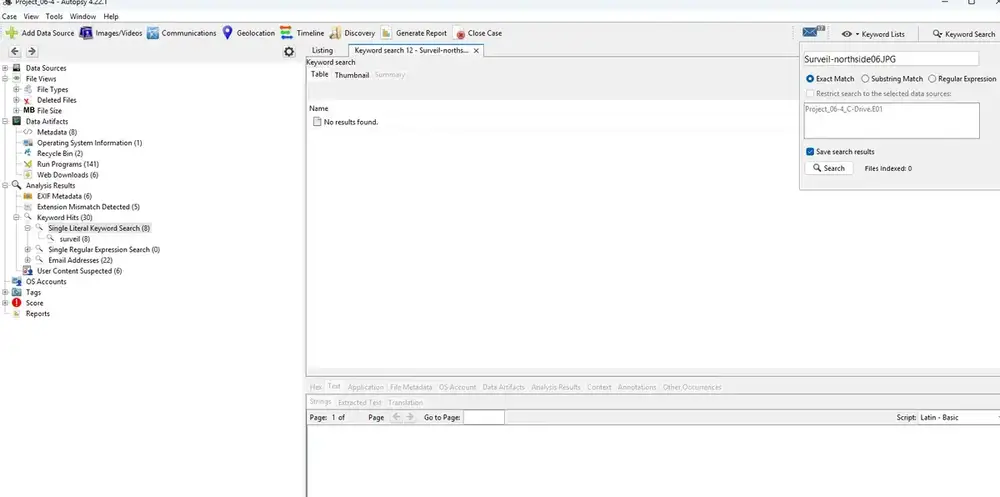
At this point it would be easy to assume the file never existed or was fully removed. But NTFS doesn’t work that cleanly.
Even though the file wasn’t visible through normal browsing, metadata artifacts still existed inside $LogFile and $UsnJrnl:$J.
This is where journal analysis becomes critical. Just because a file doesn’t show up in a standard keyword search doesn’t mean there’s no evidence left behind.
Parsing $UsnJrnl:$J (MFTECmd + Timeline Explorer)
To extract usable data from the journal file, I used:
mftecmd.exe -f $UsnJrnl_$J --csv .\ --csvf UsnJrnl_J.csv
What Actually Happened
Even though Surveil-northside06.JPG did not appear in the file system view, the $UsnJrnl:$J entries proved that:
The file existed at one point
It underwent transaction updates
It was likely renamed or deleted
NTFS still retained metadata evidence
The key takeaway is that file system visibility and artifact persistence are not the same thing.
A deleted file can disappear from directory listings while its journal history continues to exist. That’s where forensic analysis shifts from file browsing to artifact reconstruction.
This is exactly why journal parsing matters.
Why Keyword Search Failed
Autopsy performs keyword searches against indexed data and visible file system structures. If a file has been renamed, partially overwritten, or only referenced in journal records, it may not appear in standard search results.
This is why journal artifacts are critical in NTFS investigations.
If it’s not broken, fix it til it is.