Installing Pi-hole on Unraid (br0 + Static IP) - And Breaking My Network (Before Fixing It)
Installing Pi-hole on Unraid (br0 + Static IP) - And Breaking My Network (Before Fixing It)
I wanted better DNS visibility and ad blocking inside my homelab and my home network. So naturally… I installed Pi-hole for the 6th time to try getting it working this time.
And it immediately broke my entire network like the last 5 times.
Here’s what actually happened and how I fixed it.
Equipment Used
This is the hardware powering this setup:
- Router: GL.iNet GL-AXT1800 (Slate AX)
- Server: Intel NUC (11th Gen i5)
- Host OS: Unraid OS
- Pi-hole: Docker container running on Unraid
- Network Mode: br0 with static LAN IP (192.168.8.169)
My Unraid server runs 24/7, which makes it the perfect place to host infrastructure services like DNS. Running Pi-hole in Docker on a dedicated LAN IP keeps it clean and avoids port conflicts.
The GL.iNet AXT1800 handles DHCP and routing, which is where the DNS misalignment happened.
Why Pi-hole?
I wanted:
- Network-wide ad blocking
- DNS visibility
- Control over what domains are allowed or blocked
- Something lightweight that runs 24/7 on my Unraid server
Since my Unraid box is always on, Docker made the most sense.
Docker Setup on Unraid
Instead of using bridge networking, I configured Pi-hole to use:
- Custom Docker Network Type:
br0 - Static IP Address:
192.168.8.169
Using br0 allows the container to get its own IP on my LAN. That’s important for DNS because routers need a direct IP to forward DNS traffic to.
Inside the Pi-hole template I set:
- Network Type:
Custom: br0 - IPv4 address:
192.168.8.169
Everything deployed fine.
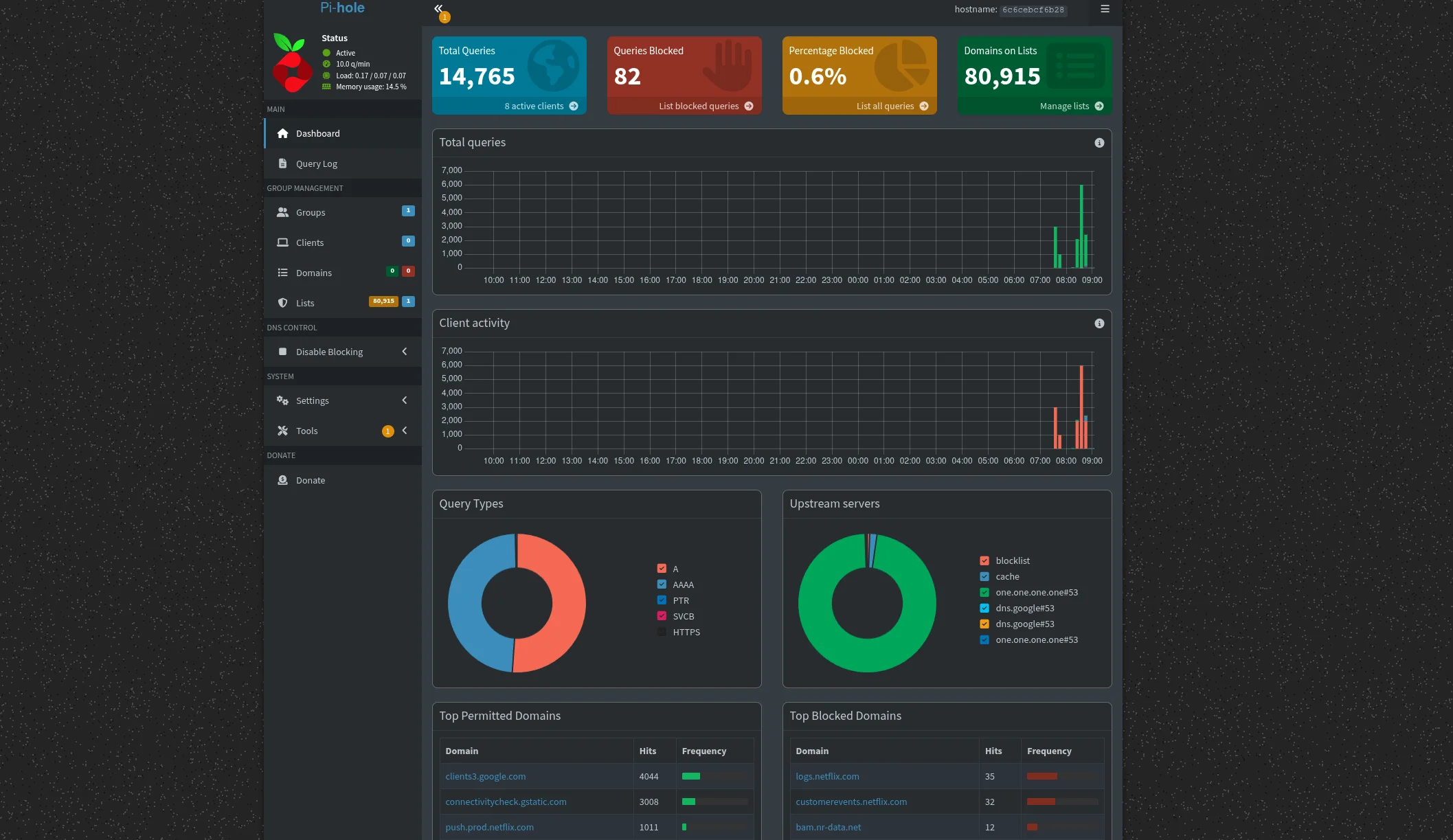
The dashboard loaded, DNS queries were showing.
So I kept on going!
The 80,000 Domain Block List
Because I like chaos, I imported a custom blocklist with 80,000+ domains.
Pi-hole handled it fine.
Queries were being blocked.
I knew it was finally working this time…. or not..
The Mistake That Broke Everything
Then I did the final step.
I changed my router’s DNS server to point to:
192.168.8.169
And instantly… Nothing loaded.
No websites. No updates. No DNS resolution at all. Discord disconnect.
I didn’t just break the internet, I erased it. So I thought..
My network was still powered on, I could only access my servers directly through the IPs.
But without the proper DNS tunneling, I created a ghost town.
So after 3 years of trying to get Pi-hole working properly, I finally figured it out. Below is where the funny happens and was the long mistake this whole time.
Troubleshooting
First thought:
Did Pi-hole crash?
Nope.
Dashboard still accessible locally.
So I SSH’d into my Pi-hole machine and ran:
1
resolvectl status
That’s when I saw the issue.
My DHCP server was still handing out:
DNS Server: 192.168.8.1
That’s my GL.iNet router IP.
So even though I manually changed DNS in one place, DHCP was still distributing the router as the DNS server.
Clients were still resolving traffic through 192.168.8.1 which was not forwarding the DNS requests to the Pi-hole correctly.
The Actual Fix (GL.iNet Router)
I logged into my GL.iNet router and went to:
LAN > DHCP
Then I set:
DNS Server 1: 192.168.8.169
(My Pi-hole static IP)
Then went back to:
`Network > DNS > DNS Server Settings > Automatic
- I had this manually set to my Pi-Hole but that was not working. This needs to be Automatic while you edit DCHP Server instead`
Saved. Applied. Restarted DHCP.
Boom.
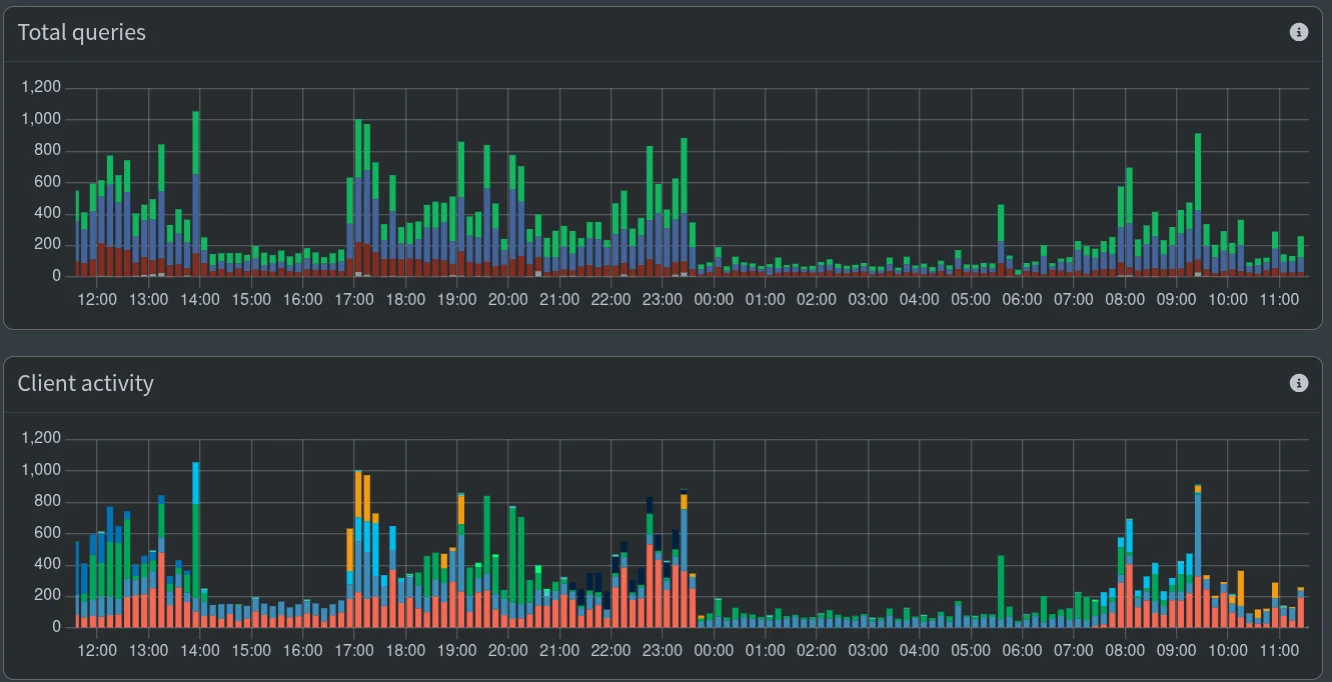
Everything started resolving instantly! This was one of the most satisfying moments in my homelab. Not because I’m trying to bypass anything, hide from anyone, but because I now have full control of my own network.
Ads, trackers, telemetry aren’t cute little “features”. They operate quietly constantly running in the background. Every single device, every app, every webpage all quietly reach out to domains that you never even asked for.
We somehow have normalized this behavior, but I haven’t. Blocking them isn’t paranoia. This is good network hygiene. It’s about limiting the unnecessary exposure, reducing the silent data collections, and deciding what traffic leaves my network.
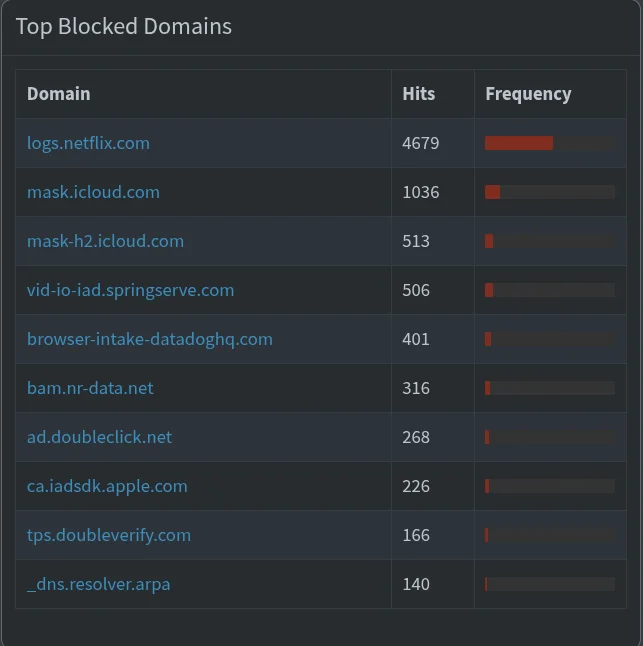
Say what you want but there is no way Netflix should have over 4,500 hits in less than 24 hours when we don’t have the TV on and no body is streaming.
Here are the top domains my network was blocking in less than 24 hours of having Pi-hole running.
What Was Happening
Here’s what broke it:
- Router DNS and DHCP DNS were not aligned
- Clients were still receiving
192.168.8.1as DNS - That conflicted with the new DNS routing
- DNS requests weren’t resolving properly
Once DHCP began distributing the Pi-hole IP directly, everything worked.
Lessons Learned
- I forgot that chaning DNS in one place, doesn’t mean DHCP is distributing the same DNS server.
br0+ static IP is the right way for Pi-hole on Unraid.- Always check
resolvectl statusbefore panicking. - Large blocklists work fine, but misconfigured DNS does not.
Final Working Setup
- Unraid Docker
- Pi-hole on
br0 - Static IP:
192.168.8.169 - GL.iNet DHCP DNS Server 1:
192.168.8.169 - GL.iNet DNS Server Settings Automatic
- 80k custom domain blocklist
Network-wide ad blocking is now fully operational.
And yes… I definitely broke it before I fixed it.
If it’s not broken, fix it til it is.